But for restaurants, it still outperforms almost everything else you can do with a marketing budget. Email returns an average of $36 for every $1 spent, more than any other channel, according to Litmus. To make sure you're seeing these kinds of returns, you need a system: what to send, when to send it, and how to run it without hiring a team. This guide gives you that system.
Why email marketing still works for restaurants in 2026
Social media feels like the obvious place to spend your time, and plenty of operators have shifted their energy there. The catch with social media is that you do not own your audience, meaning you have little control over whether your content is shown to them. A social media platform can change its algorithm overnight and cut how many of your followers ever see a post. Email works differently. When someone joins your restaurant email list, you have a direct line to your target audience that you own from end-to-end.
That ownership is why email marketing for restaurants remains one of the strongest tools for customer retention, the slow work of turning a first visit into a regular. The return on investment (ROI) is significant: Diners agree — 62% say email is their preferred way to connect with a restaurant they like (SevenRooms 2025 U.S. Restaurant Trends Report). A high open rate means your message is actually being seen, which is rare for any channel you do not pay to reach viewers. That combination of ownership and reach is what makes a simple restaurant email marketing strategy worth your time.

Why most restaurant emails don't get results
If you have sent emails before and have gotten less-than-desired results, the channel is probably not the problem — it's more than likely your approach. Most restaurants send one message to their whole list at the same time in a tactic often called an email blast. Everyone gets an identical email, so most of it is irrelevant noise for many of the people who receive it. That's a real cost, as noted above, personalized sends generate up to 16X more revenue per email than a blast like this.
Think about who is on your list. A first-time guest who tried you last week needs something completely different from a regular who comes in every Friday. A customer who ordered yesterday has no reason to get a "we miss you" message. When the same email goes to all of them, it becomes irrelevant to nearly everyone.
The fix is straightforward. Send the right email to the right person at the right time. Everything in the rest of this guide shows you how to do so.
How to build your restaurant email list
Before any of this works, you need people to email. Building a restaurant email list is less about volume and more about intent. A smaller, more engaged list is better than a packed, indifferent one every time. Five hundred guests who genuinely want to hear from you will drive more orders than five thousand who forgot they ever signed up. Here is where to find the good ones.
Collect emails in-store
Your current guests are the warmest leads you will ever have. They already chose you, so giving them an easy way to stay in touch takes very little convincing.
Put a table tent on each table with a QR code that opens a sign-up form for your email marketing. Add a short line to printed receipts inviting guests to subscribe. And ask customers to opt in when they sign up for your loyalty program, since they are already handing you their details. Give them a clear call to action (CTA) and a concrete reason to act. "Scan to get 10% off your next order" works far better than "Join our mailing list," because one promises something in return.
Add email sign-up forms to your website and online ordering page
People browsing your menu or placing an order are already interested. Catching them while their attention is high is the easiest email sign-up you’ll get.
Place an email sign-up form in your homepage header and on the order confirmation page that appears after someone checks out through your online ordering. The moment a guest subscribes, trigger an automated welcome email that delivers the incentive you promised. Following through right away, while they’re still thinking about you, sets the tone for every email that comes after.
Use social media and promotions to grow your list
Your social followers already like you. Social media marketing for restaurants is good at building on that goodwill, but a follow on social media isn't the same as a subscriber on your email list — a follow can vanish with an algorithm change, while an email address is yours to keep. Give those followers a reason to join your list, too.
Frame your email list as the place where the real perks live: early access to new menu items, subscriber-only discounts, first dibs on event tickets. Tie sign-ups to promotions you are already running. If you are launching a seasonal menu or a new dish, point people to the list as the way to hear about it first, so your list grows alongside the marketing you were doing anyway.
The 5 Email Campaigns Every Restaurant Should RunThe 5 email campaigns every restaurant should run
The most common reason operators stall on email is not knowing what to send. These five campaigns solve that. Together, they cover the full arc of a customer relationship, from the first order to the long-term regular, and most of them run automatically once you set them up. If you want more campaign ideas after these, DoorDash put together a free eBook on the marketing emails every restaurant should send. Each campaign below comes with when the email should be sent, its purpose, and a subject line you can borrow.
1. Welcome email
The welcome email is sent the instant a guest places their first order or joins your list. That moment is the high point of their interest in you, so it’s worth using well. Deliver the discount you promised, tell your restaurant's story in a sentence or two, and give them a reason to come back before the first visit fades from memory. Welcome emails earn a 91.43% open rate, the highest of any campaign type, according to Campaign Monitor.
Example subject line: "Welcome to [Restaurant Name], here's your 10% off."
2. Post-order follow-up
This one sends 24 to 48 hours after an order. Thank the guest, ask for a review while the meal is still fresh in their mind, and slip in a soft preview of something new on the menu to plant the seed for the next visit. Many happy customers will not leave a review on their own, but ask at the right moment, and many will.
Example Post-Order Follow-Up: "How was your meal? We'd love a quick review 🍜"
3. Win-back campaign
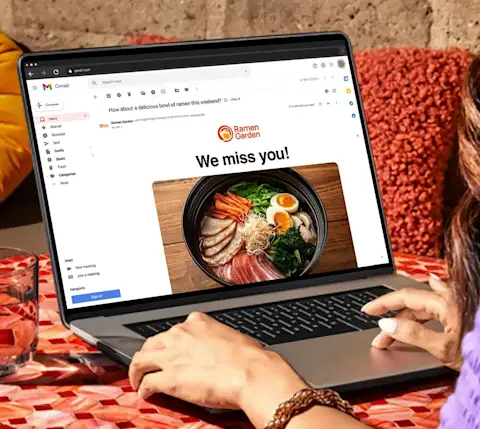
The win-back campaign triggers on its own when a guest has not ordered in 30 to 60 days. These customers already know your offering, so you’re not selling them on anything new. You’re giving them a nudge and a reason to come back now. Personalized emails with a relevant offer have some of the best conversion rates in restaurant email marketing, and they cost you nothing unless the guest redeems.
Example Win-Back Campaign: "We miss you — here's 15% off your next order"
4. Birthday and anniversary emails
Send these 7 to 10 days before the guest's birthday rather than on the day itself, which gives them time to make a reservation and bring people along. Personalized occasion offers consistently beat generic promotions, because a free dessert on your birthday feels like a gift instead of an ad. Collecting the data is simple: add a birthday field to your sign-up form or your loyalty enrollment, and the customer data you gather there informs these sends.
Example Birthday and Anniversary Emails: "Your birthday treat is waiting 🎂"
5. Seasonal and promotional emails
These tie to holidays, local happenings, and changes to your menu. They tend to get strong open rates because they arrive exactly when guests are already thinking about food and special occasions– Mother's Day brunch, a big game, a neighborhood festival, the launch of your seasonal menu. Limited-time offers work especially well here, since a deadline gives guests a reason to act now rather than later. These sends are also a natural home for special events you host, like cooking classes or a wine night. Map a simple promotional calendar at the start of each quarter so these emails are planned in advance instead of being pulled together the day before.
Example Seasonal and Promotional Emails: "Mother's Day brunch is back — reserve your spot"
Segmentation: send the right email to the right guest
Segmentation is the practical answer to the wide general email blast problem from earlier. In plain terms, it means grouping your email list by how guests behave, so each person gets a message that fits where they are in their relationship with your restaurant. Instead of one email for everyone, you send targeted emails that feel like they were meant for the reader.
Four segments cover most of what a restaurant needs:
New (placed first order in the past 60 days on first-party channels): the goal is a second visit. Best campaign: the welcome email.
Occasional (placed 1 order in the past 60 days on first-party channels): the goal is to build the habit. Best campaigns: following up post-order and seasonal sends.
Frequent (placed 2+ orders in the past 60 days on first-party channels): the goal is recognition and retention. Best campaigns: loyalty milestone emails and exclusive previews.
Loyalty Members: the goal is to reward and retain guests already in your program. Best campaigns: loyalty milestone emails, points updates, and exclusive previews.
Sorting your list manually gets tedious and difficult to scale. DoorDash Commerce Platform includes Customizable email and text marketing, a set of restaurant tools that segment your list by real guest behavior, first-time visitors, frequent diners, lapsed customers, and loyalty members, without needing you to maintain or update those groups manually. If you also send texts, the same setup supports a restaurant texting system alongside email. Commerce Platform is built for restaurants and requires an active DoorDash Marketplace account.
Loyalty programs fit in here, too. DoorDash Commerce Platform's Cross-Channel Loyalty connects directly to your email, so you can trigger automated loyalty milestone emails for members, whether they ordered in-store, online, or through Marketplace. The reward and the appreciation reach the guest automatically without you tracking points manually. That steady appreciation and reward is how customer loyalty builds over time.
How to automate your restaurant email marketing
Restaurant email comes in two forms. Custom emails are the ones you write and send manually, like a one-off note about a special event. Automated emails send themselves based on what a guest does. Both are important, but automation is what makes email marketing realistic when you’re also handling what seems like a hundred other tasks.
Automated email is simpler than it sounds. You set the rules once: someone orders for the first time, a guest has not been in for 60 days, a loyalty offer to spend. After that, the right email goes out at the relevant moment without you lifting a finger. For an operator without a marketing team, that’s what makes email marketing most feasible and effective.
DoorDash Commerce Platform's automated email marketing runs on exactly this idea. It gives restaurants pre-built, branded email campaigns that fire automatically based on customer behavior, powered by the same technology behind DoorDash Marketplace. Because it lives where your Marketplace account already does, there is no second platform to learn. Commerce Platform is built for restaurants and requires an active Marketplace account.
The results speak for themselves. Automated Email Marketing boosts order frequency by an average of 15% among new and returning customers.* One operator put it plainly in a DoorDash success story: "Automated email marketing is critical with customers, whether they're coming into your restaurant the day of or they haven't been in a while. Those follow-up actions are going to keep you on their mind."
*Based on internal DoorDash data from March 2024 through March 2025.
Email marketing best practices for restaurants
Strategy aside, a few mechanics separate emails that get opened from emails that get ignored. One worth saying up front: not every email needs a discount. Menu updates, a chef spotlight, a loyalty milestone, all of these build your restaurant's presence without cutting into margins, and mixing them in keeps people from tuning out. Variety is what keeps an email worth opening.
Subject lines that get opened
Your subject line decides whether the rest of the email is read, and specificity beats cleverness almost every time. "Free dessert with your next order" will outperform "We've been thinking about you," because it tells the reader exactly what is in it for them. Three rules cover most of it: put the offer in the subject line when there is one, keep it under 50 characters so it reads cleanly on a phone, and use the guest's first name when you have it. When you are torn between two email subject lines, use A/B testing, which means sending each version to part of your list and letting the email tool send the winner to everyone else. Most tools handle this automatically, and you set it up once.
How often should you send?
For most independent restaurants, 2 to 4 emails a month is a reliable cadence. Push past one a week, and subscribers can start climbing. Drop below once a month, and guests start forgetting who you are. Your automated campaigns sit outside this count. A welcome, a win-back, or a loyalty email triggers on behavior rather than the calendar, so they never pile up, no matter how many go out.
Track these metrics
Three numbers tell you almost everything:
Open rate — shows whether people are seeing your emails.
Click-through rate (CTR) — the share of readers who click a link inside, shows whether they're acting on them.
Repeat orders from email recipients — shows whether those clicks turn into actual revenue.
For context, restaurants and cafés see a median 44.32% open rate and a 1.06% click rate, per MailerLite's benchmarks. Treat these as a feedback loop: watch what is working and do more of it. Operators on DoorDash Commerce Platform can see open rates, click rates, and order data together in the Merchant Portal, so there is no separate analytics tool to wrangle.
Keep your emails on-brand
Every email should look and sound like your restaurant. Same logo, same colors, the same voice your guests hear when they walk in. This slips most often with automated campaigns, since those run without you looking at each one. Set your templates up with your branding before you switch any flows on, and use high-quality images of your actual food rather than stock photos. Good email design and consistent restaurant branding make even an automated message feel personal. DoorDash Commerce Platform's automated email marketing uses pre-built, branded templates, so you set your look once, and every email reflects it.
Ready to run email marketing without the manual work?
You are already reaching customers on DoorDash Marketplace. DoorDash Commerce Platform gives you the tools to bring them back, with pre-built, customizable, branded email campaigns that run on their own, powered by the same technology behind your Marketplace account. One setup, no marketing team required.